
USFans Spreadsheet Links: Keep the Product and Its Option Together
A saved USFans spreadsheet link is useful only if you can recover the choice that made you save it. Reaching a page with a familiar picture is a start, but the size, colour or included pieces may not be selected when the page opens again. Before ordering, reconstruct that choice instead of assuming the link remembers it.
This guide explains how to handle an existing reference, a changed destination and an unsuccessful import. For broader discovery, return to the USFans spreadsheet collection. To compare the usefulness of different lists, read best USFans spreadsheet.
First identify what the button actually opens
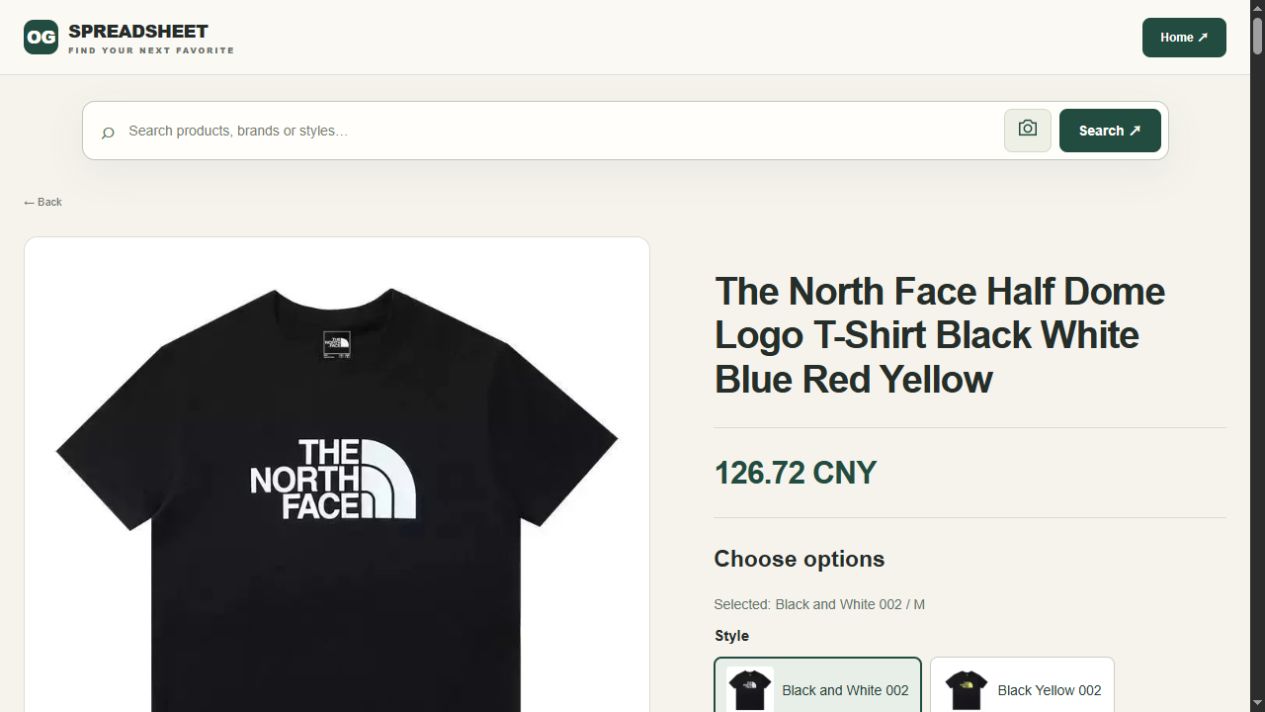
Not every useful shopping link is a product link. A category can help you browse, a search result can introduce alternatives, and a product page can describe a particular item. An article explains a decision. Confusing these destinations causes trouble when you expect one click to restore a precise selection.
| Destination | What to use it for | What still needs doing |
|---|---|---|
| Individual product | Inspect the candidate you intended to compare | Confirm its selectable version and current details |
| Category | Find options within a product family | Choose an item rather than treating the category as an order |
| Search results | Investigate possible matches | Establish whether any result is the original item |
| Guide or collection | Understand the process or discover references | Open the relevant item before making a purchase decision |
For example, open the T-shirt reference on USFans and record the exact option you would compare. The button opens a fixed product page; select and record the variant yourself rather than assuming a saved choice or an account import accompanies the link.
Save enough context to recognise a mismatch
Keep the original address together with a short description of the intended product. Note the exact option wording you chose, including the purchase unit if one selection can contain several pieces. A small private note is often enough to prevent a later mix-up.
For a hypothetical T-shirt selection, “dark green, medium, one shirt, chest pocket” is more helpful than “nice tee.” If the reopened page shows a similar shirt without a pocket, you have a concrete reason to stop. If it shows the correct style but defaults to another colour, you need to reselect the option rather than conclude that the entire link is wrong.
Do not publish account-specific checkout addresses, payment links or order records as public shopping references. Product discovery does not require sharing someone else's contact information or private account access.
Share the selection as well as the address
If another person needs to recover your choice, send a public product reference with a brief option note. Keep account, order and payment links out of it. The receiver should be able to distinguish “I found the item” from “I restored the intended selection.”
The dated T-shirt example in this guide can be recorded like this; it is a reference note, not a current stock or price confirmation:
| Detail to retain | Example from the dated reference |
|---|---|
| Product address | The OG T-shirt reference linked above |
| Selected wording | Black and White 002 / M |
| Visible identifier | Black tee with a white chest graphic |
| Observation date | 1 October 2026 |
| Check when reopening | The same option is still selectable and its current details match the intended choice |
A recipient who sees the right shirt but another default size should reselect and compare, not assume the address is broken. If the option is gone, retain the old note and label any replacement as a different choice. This also helps when returning to a USFans link after several days: the saved wording tells you what to verify without pretending that the URL preserves every selection.
Reopen once, then compare before you act
When a saved address works, compare its current page with your note. Check the product identity first, then the option, then the amount and conditions relevant to the next step. A working page proves that the address opens; it does not prove that an old price or earlier selection remains valid.
The sequence matters. There is little value in comparing the price of a different version. Likewise, checking a familiar size label is not enough if the measurement chart belongs to another product. The size guide explains how to use measurements without transferring them between unrelated garments.
If the page changes after selecting an option, review the resulting choice again before payment. Keep the confirmation associated with that selection, not with the first gallery image you saw.
What a converted link does—and does not—establish
You may encounter a tool or entry field intended to open a source product through an agent. Use it only for its stated purpose and inspect the returned page. This article does not provide an active link converter, and opening an OG product button does not perform an import into a USFans account.
If a conversion returns the intended item but loses the colour or size, treat the item-level match and the option-level match as separate results. Recover the intended option explicitly. If it returns only a search page, you still need to identify the matching product; the presence of similar results does not establish a successful conversion.
Keep the original source address while checking any resulting destination. Avoid guessing how to rewrite identifiers or deleting unfamiliar parts of an address in the hope that it will work. Some address components can affect what opens. A recognised product page or the platform's actual supported workflow is a better starting point than repeated speculative edits.
Compare the outcomes of a USFans link action
When handling USFans links, write down which result you actually obtained. Opening the correct product, restoring its selected option and placing an order are three separate outcomes. A manually entered product description is also not evidence that an automated conversion succeeded.
If the supported workflow requires manual details after an unsuccessful import, carry over only information that belongs to the original item. Check the seller, model, purchase unit and option before continuing. If one of those cannot be established, ask about that specific mismatch instead of substituting a similar listing without noticing the change.
For instance, a result can show the correct shirt and seller but only a default size. That is an item match with an unresolved selection. A result showing a different seller's similar photograph is a new candidate, not the same level of match. Keeping those outcomes distinct prevents a successful page load from becoming an unsupported claim about what you will receive.
When the saved link no longer leads to the item
Distinguish three situations before replacing it:
- The page does not load. You have not yet learned whether the product is unavailable. A loading failure is not a stock statement.
- The product opens but the desired option is absent. Another option may remain visible, but that does not satisfy your saved choice.
- The destination shows a different product or a general page. The old reference no longer restores the same candidate, even if the new page looks relevant.
For the first case, avoid placing a second order merely because a page is slow or unclear. For the second, decide whether another option genuinely meets your requirement. For the third, preserve the old reference and assess any replacement as a new candidate.
The archive guide can help you interpret an older saved reference. An archived image may explain what you originally meant, but it cannot establish today's availability or purchase conditions.
Similar photographs are leads, not identity checks
Imagine that your old link showed a two-piece set. A search later finds a listing using a very similar photograph, but its selectable option is only the top. Replacing the old address without reading the purchase unit would change what you buy while leaving your shortlist looking almost unchanged.
Compare details that can separate the candidates: included pieces, visible construction, option labels and any stated product identifiers. Do not borrow measurements, reviews or QC pictures from the older reference until their relevance to the new candidate is established.
Read the QC photos guide for checking what an image actually shows. For a set, confirm each included component; for accessories, check the closure, dimensions or other feature that matters to your use.
Carry the chosen reference into the next stage
Once you have a candidate you can identify, keep its choice separate from the progress of an order. A saved product URL is not an order number, a warehouse receipt or a tracking reference. Those records answer different questions.
Use the USFans spreadsheet guide when moving from selection into the purchasing process. If your concern is whether a link is asking for unnecessary credentials or taking you somewhere unexpected, consult spreadsheet safety before entering account details.
Common link questions
Does a working link mean a spreadsheet entry is current?
It means the address opened at that moment. Check the selected option and the details you rely on as well. A functioning page can still differ from an old row description.
Should I replace a broken product link with a category link?
You can use a category to look for alternatives, but label it as browsing rather than the recovered original item. Otherwise a later reader may believe the exact product has been found when it has not.
Can I use another item's QC photos if it looks identical?
Not as proof of your selected item. Similar appearance does not establish the same option or photographed unit. Use the image as a question to investigate, not as a substitute for relevant inspection information.
Why does the product open with the wrong size?
The saved address may not preserve an option selection. Read and select the intended option on the destination, then verify the resulting choice before proceeding. Do not assume an old selection survives simply because the product image is correct.
Back to the USFans spreadsheet
Spanish link guide · Polish link guide · Latvian link guide · Back to top
Preserve the old row before changing anything
Keep the saved address, original description and any date attached to the record. Note whether the date describes the sheet, the row or your own saved copy. A year in the title does not establish when each item was checked.
For example, a collection titled “2025” might contain a row saved in November and a destination you check the following September. Those are three different pieces of context: the collection's label, your saved observation and your latest check. Record them separately. Checking the destination today does not turn an undated photograph or an earlier price into a current observation.
If the row contains a price, retain its currency and context where known. Do not rewrite an old amount with a new number and leave the original date unchanged. That would create a record that never actually existed.
Keep associated images attached to the source they came from. A product gallery, a buyer's photograph and a warehouse inspection image are different kinds of material even if they show a similar item.
Keep alternatives visible instead of silently replacing originals
If a new reference is promising, create a separate comparison entry or clearly identify it as an alternative in your private notes. Preserve the old description so you can understand why you originally saved it.
This also helps avoid duplicate comparisons. Two rows can lead to the same current item even when their older labels differ. Establish the destination identity before counting them as two independent options.
Do not assume every recurring image represents another buyer's experience. Reposts can preserve the same earlier material, and repeated appearances do not create additional purchases.