
USFans Spreadsheet Guide: From a Saved Find to a Parcel Decision
Use a USFans spreadsheet to choose a product, then treat purchasing and delivery as separate decisions. A reference link does not choose your size, pay for an order or arrange an international parcel. This guide follows those transitions so that you know what to check before moving on.
USFans' shopping-agent guidance checked on 30 September 2026 separates two payments: the goods and China domestic delivery first, then the international parcel. Reserve money for the second stage before choosing how much to spend on products. The amount and applicable charges still come from your own transaction summary.
What the USFans agent service changes—and what it does not
A shopping agent sits between a purchase request and later warehouse and parcel decisions. That does not make the spreadsheet, the original seller, the warehouse inspection and the delivery carrier the same service. Keep their roles distinct when deciding whom to ask about a problem.
| Your question | Start with this record | Do not substitute |
|---|---|---|
| Was the intended variant requested? | Purchase request, selected option and any agreed changes | The photograph on a saved list |
| Has that item arrived? | Matching item or warehouse status | Another product in the same basket |
| What was inspected? | Received-item photos and applicable inspection scope | A promise about all aspects of quality |
| Which parcel contains it? | Parcel contents and associated tracking reference | The original product address |
For an unfamiliar source, ask whether the item can be purchased and which purchase restrictions or additional charges apply before paying. Keep the answer with the actual item request: acceptance of one product does not establish that a different seller or product can be handled on the same terms.
If the task is an option change, identify the item and ask whether that change is still possible at its present stage. If the task is transport, identify the parcel and service instead. Send a focused request through a private support channel rather than posting account information publicly.
1. Decide what the find must do for you
Begin with a practical requirement. For a lightweight top, that might be enough room across the chest without excessive length. For a jacket, it might be comfortable layering. Choosing the requirement first makes it easier to reject an appealing item that will not serve your purpose.
Use the USFans spreadsheet collection to find the relevant reading path. The best spreadsheet comparison helps you evaluate the information attached to a candidate; it is not a substitute for checking the chosen item.
Inspect the T-shirt reference on USFans if you need a top. Identify the selected design and its measurement chart before saving it; placing the order is a separate step in the purchasing service.
2. Turn the reference into an exact choice
Keep the item address together with the colour, size, quantity and included pieces. Compare the selected option with the photograph and description. If the destination opens a different product, resolve that mismatch before considering its price.
For clothing, compare measurements with a garment you already wear in the intended way. Record how the measurement was taken. A width across a flat garment is not automatically interchangeable with a body circumference; a size letter is not a measurement. Use the size guide for the comparison you need.
If an address stops working or a page forgets your option, follow the spreadsheet links guide. Do not replace a missing option with a visually similar one without reviewing the difference.
3. Check the purchase request before paying
Review the item and option in the actual purchasing workflow. Make sure the quantity and purchase unit still match your plan. Look at which charges are included at this stage and which are not.
Keep a reserve for international shipping and other applicable costs instead of treating an early product amount as a final delivered total. A promotional saving should be evaluated against the same intended basket. Adding an unwanted item to reach an offer threshold changes the purchase, even if the discount percentage improves.
Before authorising a payment, verify the account and transaction context. If the outcome becomes unclear, check the order and payment records before trying again. A slow screen alone does not establish that no payment occurred. The payment guide covers the distinction between a payment record and progress on an order.
4. Follow each item until it reaches the warehouse
Once you have a purchase record, use that record to ask about progress. Your saved spreadsheet row tells you what you wanted; it does not tell you what the seller has dispatched or what the warehouse has received.
For a basket with several products, keep their states separate. One received item does not mean the entire basket is ready. Similarly, a delay affecting one item does not describe the status of everything else.
Imagine a hypothetical order containing two shirts and a cap. One shirt has arrived, the other is still awaiting an update, and the cap has arrived in a different colour from your selection. There are three tasks: inspect the first shirt, ask about the second, and resolve the cap mismatch. “My order is ready” would hide two unfinished decisions.
Use the warehouse guide for this stage. If you contact support, refer to the affected item and explain the specific difference or missing update rather than sending an entire unrelated purchase history.
5. Inspect the received item while the decision is still open
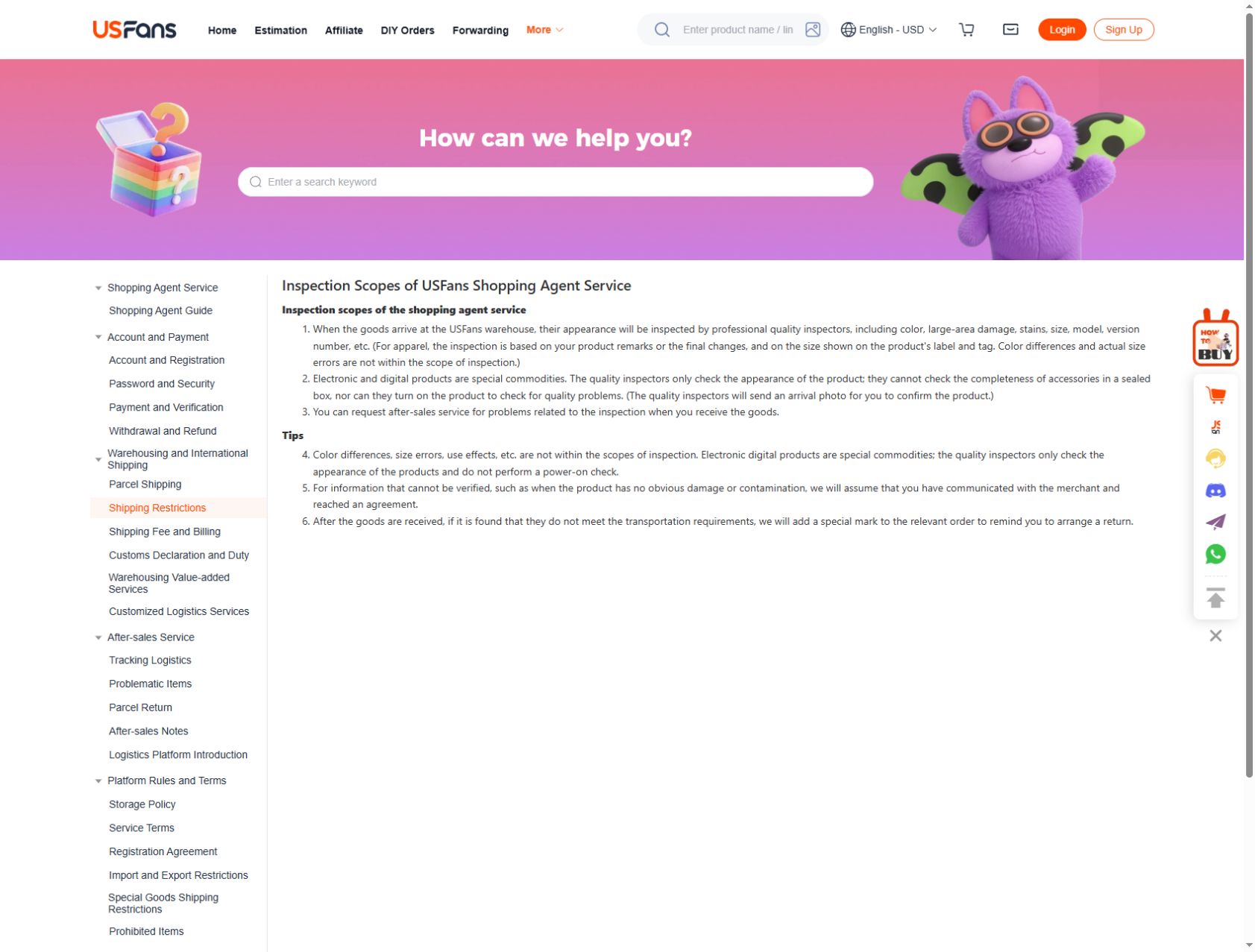
Match inspection photographs to the correct item before comparing details. Start with what you can actually see: the selected appearance, visible damage, a label or a construction feature relevant to your choice. If the decisive measurement is absent, ask whether the needed check is available rather than inventing a value from the picture.
The USFans inspection rules checked on 30 September 2026 describe appearance and clothing-label checks, while excluding actual size discrepancies and use-performance checks. They also state that electronics are not powered on for inspection. If sleeve length is your deciding factor, request a measurement with clear endpoints; a photograph of an M label cannot answer it.
For the hypothetical cap, compare the received colour with the selected option and raise the mismatch before treating it as ready to pack. If the question is less clear-cut—such as how a shirt will sit on your body—a label photograph alone may not answer it.
Read QC photos for interpreting visible details. If you want a correction, cancellation or return, check the conditions applying to that order promptly; do not assume that every seller, item or stage has the same available remedy. Keep the request and response associated with the affected item.
6. Build the parcel from items you have decided to keep
Make the parcel list deliberately. Confirm which items belong in it and whether any unresolved item should remain out while you seek an answer. Review packing choices for the contents rather than choosing solely by the smallest-looking box.
Removing packaging can change what protection or presentation remains. Adding packaging can change weight or dimensions. Decide what matters for the actual contents, then use the resulting parcel information when comparing delivery options.
The shipping calculator guide explains the inputs needed for an estimate. USFans' weight guidance notes that some services compare actual and volumetric weight. The applicable calculation depends on the service, so do not reuse a divisor from an unrelated parcel as though it were universal.
An estimate made before packing is useful for planning, but it should not be silently substituted for the final parcel measurements and amount.
7. Compare delivery services for your destination and contents
Review the services actually offered for the parcel. Check the destination, content restrictions, cost scope and delivery estimate together. The cheapest visible option is not helpful if it does not accept the contents or serve the address you need.
A quoted transit estimate is not the same as a guaranteed arrival date. Keep the timing of purchasing, warehouse handling and international movement distinct when planning for an event. Avoid using a stranger's delivery experience as a deadline promise for your parcel.
See the shipping guide for the broader comparison. Country and language guides can help you read the relevant questions, but a translated page does not make a delivery rule universal across countries.
8. Keep the parcel record through delivery
After dispatch, use the parcel and tracking references rather than the original product URL. Read the event and timestamp together. If an update is unclear, ask about that parcel instead of assuming that every order sharing a purchase date has the same status.
On arrival, compare the contents with what you expected to receive. Retain the records needed to explain a concrete issue, and remove addresses or other private details before sharing any photograph publicly. A useful question can usually identify the affected product and problem without exposing the recipient.
The tracking guide is the next path for parcel updates. For evaluating other people's accounts of these stages, read the USFans spreadsheet review guide.
A compact handoff checklist
| Before moving on | Keep this clear |
|---|---|
| Reference to purchase | Exact item, option and intended quantity |
| Purchase to warehouse follow-up | Matching order or item record and current state |
| Inspection to parcel selection | Which items you are keeping and which issues remain open |
| Parcel selection to payment | Contents, destination, packing information and charge scope |
| Dispatch to follow-up | Parcel reference, tracking event and date |
These records need not become a complicated spreadsheet. Their purpose is to prevent the next action from relying on a different item's details.
Common beginner questions
Do I order directly from this guide?
No. Reading links explain the process and product buttons open OG references. Purchases, payments and private order management happen in the relevant service's actual workflow.
Should I pay for everything before checking shipping?
Estimate the delivery budget before committing to products. Later, compare the services and amount applicable to the actual parcel. Those checks happen at different levels of certainty.
Can I skip QC because the spreadsheet has photographs?
Reference photographs and photographs of a received item answer different questions. Establish what the image represents before relying on it for a warehouse decision.
Where should I start if something looks suspicious?
Stop before entering more account or payment information and establish the destination and transaction involved. The spreadsheet safety guide covers that separate concern.