
USFans Warehouse: Know Which Items Are Ready for Your Next Decision
The USFans warehouse stage connects a product purchase with an international parcel. Treat it as a set of item-level decisions: what has arrived, what has been inspected, what you want to keep and what can be included in a shipment. One received item does not make an entire basket ready.
If you are new to the process, read the USFans spreadsheet guide. If your parcel has already left, move to tracking rather than using a warehouse item record to explain its international journey.
Separate receipt from readiness
An arrival record tells you something different from an inspection image or a completed packing decision. Read the information actually available for the affected item. Do not infer that every later step has happened because an earlier one is recorded.
Keep the selected option beside the warehouse record so you can compare it with the received item. Similar products in the same basket can make a mismatch easy to overlook. A photo associated with one shirt should not be used to approve another shirt merely because both are dark colours.
The spreadsheet links guide helps recover the original selection. Keep that reference separate from the order and item identifiers used for private warehouse enquiries.
Make a small item-by-item decision list
| For each item | Useful question |
|---|---|
| Receipt | Is this item recorded as received, or am I reading seller-dispatch information? |
| Identity | Does it match the intended product and option? |
| Inspection | Are the views or measurements needed for my decision available? |
| Open issue | Is there a question that could change whether I keep it? |
| Storage | What deadline and conditions apply to this item? |
| Parcel | Have I decided whether this item belongs in the next shipment? |
The list is a way to organise your decisions, not a claim that the account interface uses these exact labels. Use the actual record and ask about any unclear stage.
Handle a mixed basket without losing the exception
Imagine a hypothetical basket containing trousers, a cap and a sweater. The trousers are ready for your decision, the cap's selected colour is unclear, and the sweater has not yet arrived. A single note saying “waiting for warehouse” hides the useful differences.
For the trousers, review the relevant measurements. For the cap, ask about the option before approving it. For the sweater, seek the item's current progress rather than requesting inspection pictures that may not yet exist.
If you later submit only the trousers, record that choice. Do not assume the other two items have been included just because they were purchased in the same session. Parcel contents should reflect your actual selection.
Review images while the item decision is open
Use the QC photos guide to connect an image to a specific question. A readable label can help identify an option; a measurement can address a dimension; an overall photograph can show visible appearance. None automatically answers every question about the product.
If you are comparing an upper layer, open the garment options on USFans. After an actual purchase, compare your selected option with that item's own warehouse images, including the neckline and any details needed to identify the variant. The public product reference is not evidence that this garment is held in your account or has passed inspection.
Ask for a missing detail when it could change your decision, and check whether that request is available under the service offered to your item. Do not assume every additional image or measurement is included at no cost.
Check storage conditions before choosing to wait
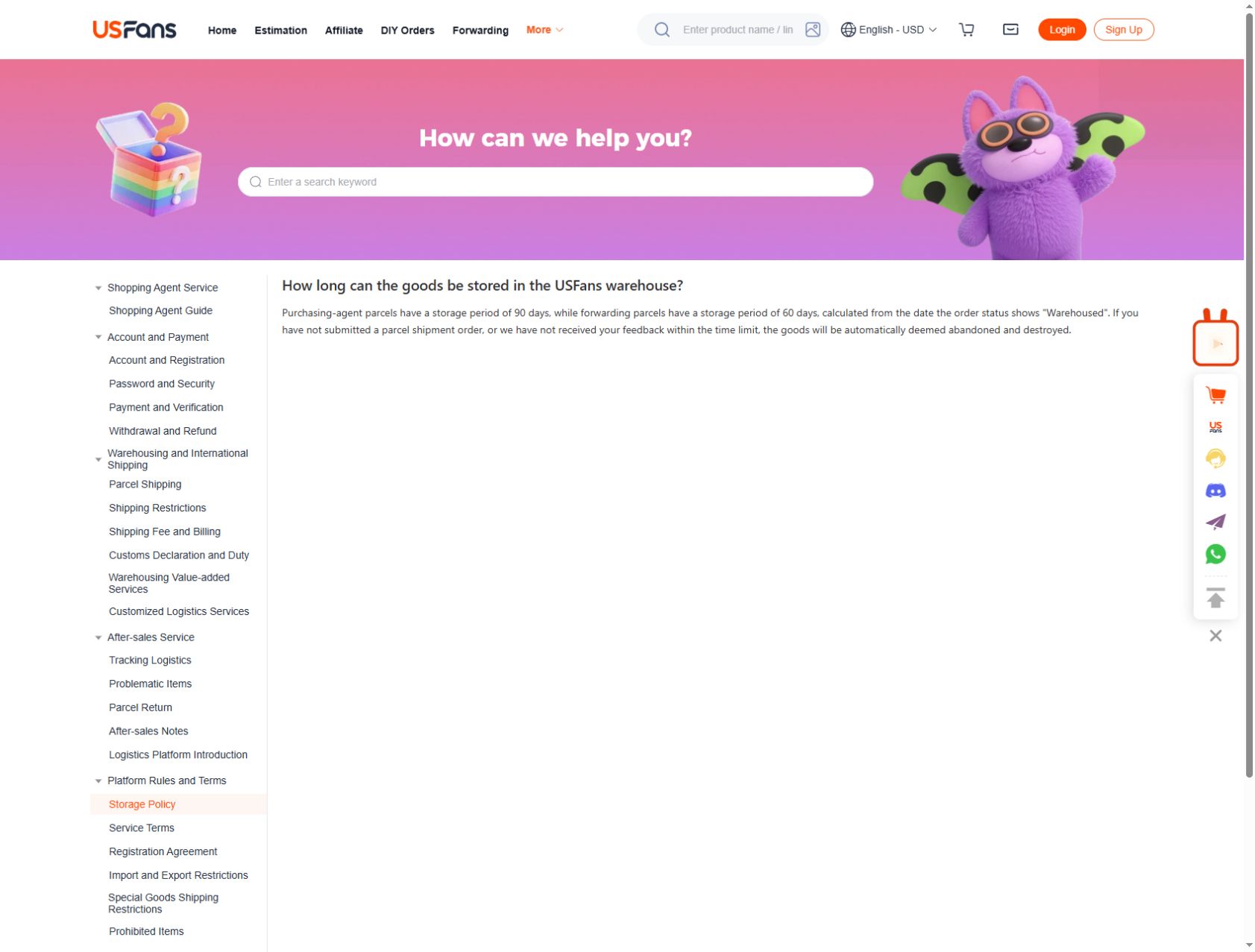
Waiting for another purchase uses part of the time available for the items already stored. The USFans storage policy checked on 30 September 2026 states 90 days for purchasing-agent parcels and 60 days for forwarding parcels, calculated from the date the order status shows “Warehoused.” The purchase date and the date you first looked at the warehouse screen are not substitutes for that starting point. Identify the service type and the recorded date for each item before deciding to wait.
Confirm the start date, the applicable deadline, any charges and what action is required before the deadline. If you need more time, ask what options actually exist; do not assume an extension is automatic or available.
Storage limits deserve attention even when the item itself looks fine. USFans' published storage guidance warns that goods may be treated as abandoned and destroyed after the applicable limit without the required shipment submission or response. Confirm the current deadline and required action for your item before choosing to wait. Ask about that specific item rather than relying on a generic forum answer.
Do not turn a location label into a shipping instruction
A warehouse name, internal location or address shown in an old screenshot is not enough to direct a new parcel or a return. Use the current instructions issued for the service and transaction involved, including any identifying details the service requires privately.
If you are arranging a return, confirm the authorised destination and process for that item. Sending it to an address copied from another buyer's record could fail to identify the transaction you mean. Read returns and refunds for the distinction between a request and a completed return.
This guide does not publish a universal USFans receiving or return address. The address you need should come from the workflow that applies to your shipment.
Move from stored items to a defined parcel
Choose which items to send, resolve questions that would change that selection and review the packing requested for the contents. A stored product's information is not automatically the packed parcel's weight or dimensions.
Use the shipping guide to compare services for that defined parcel and the shipping calculator guide to understand estimated inputs. Recheck after packing changes rather than carrying an earlier assumption into the final decision.
Once a parcel is created, keep the relationship between its contents and the remaining warehouse items clear. The shipment's progress and the stored items' deadlines are now separate concerns.
Frequently asked questions
Does warehouse arrival mean QC is complete?
Do not assume it. Check the specific item's available records and inspection information. Receipt and inspection answer different questions.
Can I leave everything until my final item arrives?
Check each applicable storage deadline and the uncertainty around the pending item first. Waiting may suit your plan, but it should be a deliberate decision rather than an overlooked limit.
Can I use another customer's warehouse address?
Use the instructions supplied for your own service and transaction. Another record may be old, service-specific or require different identifying information.
Is a warehouse photograph proof that the item will fit?
Not by itself. The size guide explains how relevant dimensions and your intended fit must be compared.
What should I ask when the status is unclear?
Identify the affected item privately, quote the latest event and ask which stage is confirmed and what action remains. Avoid combining several items with different states into one vague question.